
instantiator.dev
I'm a senior tech lead, writing about tech, volunteers, public safety, and collective intelligence. This blog contains articles, tools, code and ideas.
- Presence (tool) (in dev)
- ListSky (tool) (in dev)
- The Epistolorean (service)
- Consensus Games (service) (in dev)
- JSON to Smart CSV (tool)
- Escape the Review (profile)
- In this house... (calendar)
- A chat with Lewis (call)
Free AI-assisted coding 5: Defeating slop with good practice
tutorialIn previous tutorials you’ve set up an AI assisted development environment, and created your first project. Now it’s time to think about how to ensure you produce good code that’s reliable. The good news is that the software development industry has done a lot of thinking about this…
Good practice
|
|
|
Attribution: Best Practice Vectors by Vecteezy. This particular image by Taufiq Anwar. |

You have responsibilities. When you write code for others to use, and before you commit to holding or processing data that’s important to anyone else, you should be able to show that it will run correctly and handle data sensitively.
Writing code that’s easy to understand is an important step towards this.
Unfortunately coding agents, following their vanilla behaviours alone, will often produce a lot more code than necessary, arranged in a jumble. When developers do this, it might be refered to as messy or spaghetti code. When AI produces it, we sometimes refer to it as slop.
⚠️ These terms can be used to bully others: Calling someone’s code messy, or accusing them of churning out slop, is a cheap way to deride and discourage someone1.
I feel strongly about this: Everybody is learning, and everybody has different levels of experience. Do better. Elevate others by offering kind advice. Make pull requests to help improve and describe why your changes will help. If you want people to do better, you should support them.
It’s also fair to say that long before AI entered the scene, developers took a view of how much effort to put into software development, and produced code of varying quality. Many factors affect this: deadlines, resources, experience, end user needs, other priorities…
This is problematic because:
- Code that’s difficult to read is difficult to maintain and improve
- When it’s difficult to do work, it costs many more tokens each time your coding assistant has to do anything
- Code that’s difficult to understand is difficult to assure
- How do you know it will protect your users’ data?
- How do you know it won’t make mistakes?
💡 I’ve assembled a suite of guidelines, skills, and scripts that you can apply to any project. It’ll support your coding assistant to make good decisions about the code it writes. It’s deliberately built to complement small, inexpensive, agents with limited context (as well as larger, more capable agents).
I’ve deliberately placed information about it towards the bottom of this post. I want you to read about, and understand, the problems it targets before making use of it.
I recommend you use a code quality tool, with every AI-assisted coding project. You’ll probably want to customise it to your needs once you’re familiar with some of the premises in this post.
There are some key aspects to writing good code and, as a solo developer, a project lead, or working with an AI coding assistant, you can shape what’s produced to be the best it can be:
- Manage complexity to make your code easy to understand and modify
- Ensure reliability to give assurances that your code does what you intended it to do
- Follow good secure coding practices to be compliant with data protection laws, and protect your users data
This post discusses complexity, and we’ll cover reliability, testing, and security in subsequent posts.
A quick word on security
Having said that, before we go any further, an important security guideline to protect yourself:
Never store live secrets, passwords, or keys in a public repository. It may seem like the easiest way to get started, but you are putting those secrets at risk. There are attackers who regularly scan public repositories looking for keys they can use to spend your money, or access your services.
And while we’re here - if you use a password to sign in to your repository provider, or your email, make sure it’s a good password. If you can, turn on 2 factor authentication (2FA). This will help protect anything you store in private repositories, too.
⚠️ Remember that your email address can often be used to reset a password. An attacker with access to your inbox could respond to verification checks, copy authentication codes, approve password changes or hide them from you.
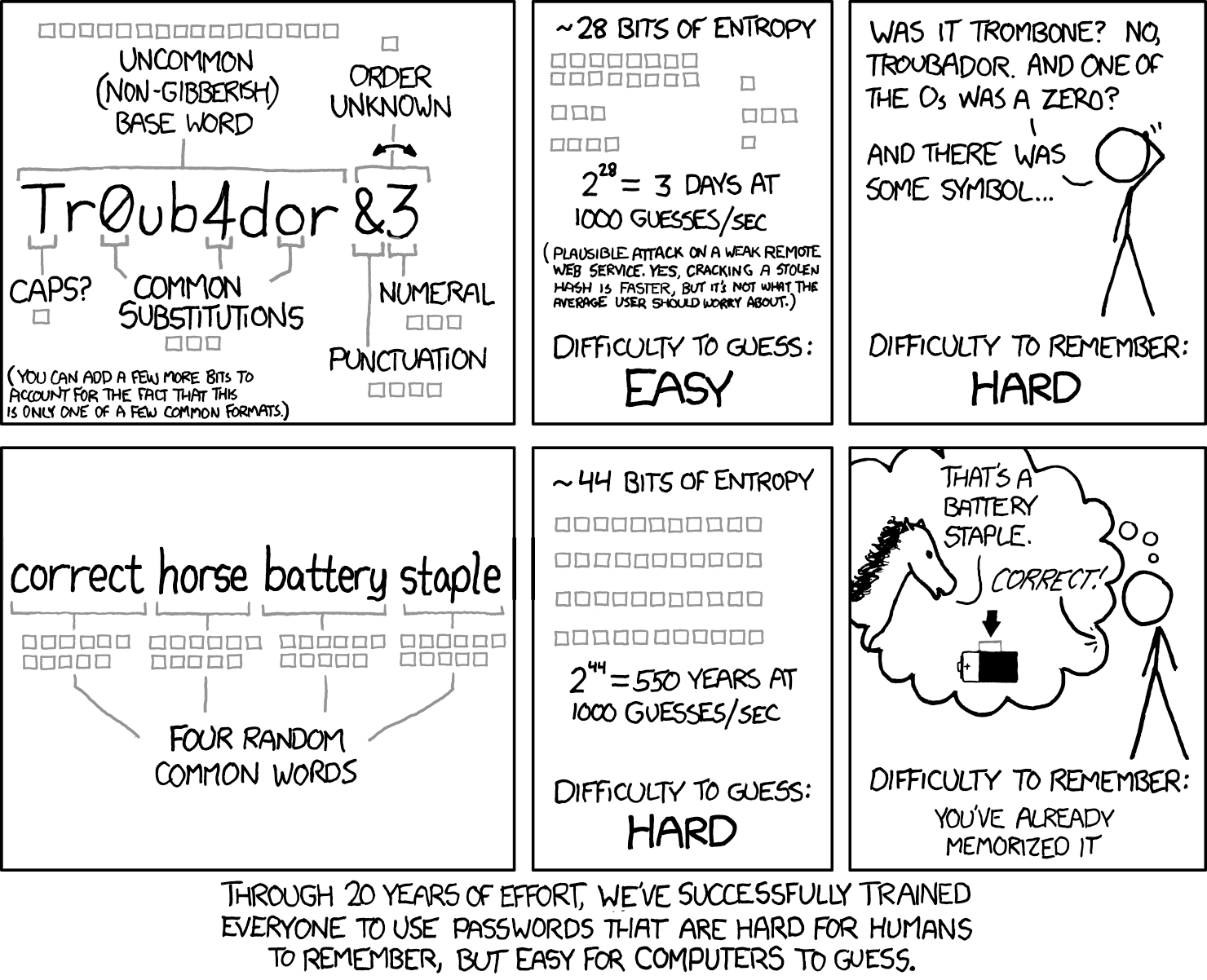
This xkcd comic explains how to pick a good password. There are plenty of good password generators available, including correct horse battery staple, inspired by the comic. The NCSC (the UK’s National Cyber Security Centre) also offers similar advice: The logic behind three random words
Managing complexity
The risk
Even if you’re an experienced developer, and even if you’re working on a small personal project, your code base is probably going to grow past the point where a single person can know or remember everything about it.
Developers and coding assistants must read and understand existing code to be able to write more code. A lot of this advice applies to code written by, and written for, people and machines alike.
Agents have limited context windows, even if they’re running (expensive and) large models.
Everything a coding assistant needs to consider is a part of its context. As it reasons about your project, to understand what it needs to do next, this fills with data - which means each action it takes consumes more tokens and takes longer.
As the context grows near its limit, some assistants compact it - and each time they do, it degrades a little (reducing what they’ve learned to a summary).
It’s important to make sure that code is sufficiently structured and clear to be able to work as efficiently as possible. Good documentation, following conventions, and structuring your project can help with the discovery of different parts of the code - reducing the reasoning needed to understand it.
For example: In the previous tutorial, we added new functionality to the Streamlit application. It’s very likely that your coding assistant has placed all the code for that in the same file.
Look at it now: It’s probably okay to read, because it’s a simple project, so you can follow what it does with a little thought. There’s plenty we can do to make it more readable, and more easily understood, though…
What my coding assistant produced...
import io

import pandas as pd
import streamlit as st

st.title("My Little Data Prototype")
st.write("Hello! This is a blank starter app.")

name = st.text_input("Enter your name")

if name:
    st.write(f"Welcome, {name}!")

st.divider()

uploaded_file = st.file_uploader("Choose a CSV file", type=["csv"])
upload = st.button("Upload")

if upload:
    if uploaded_file is None:
        st.error("No file selected. Please choose a CSV file first.")
        st.session_state.pop("valid_df", None)
    else:
        try:
            df = pd.read_csv(io.BytesIO(uploaded_file.getvalue()))
        except Exception:
            st.error("Could not read the file as CSV. Please check the file format.")
            st.session_state.pop("valid_df", None)
            st.stop()

        if not {"A", "B"}.issubset(df.columns):
            missing = {"A", "B"} - set(df.columns)
            st.error(f"The CSV file must contain columns A and B. Missing: {', '.join(sorted(missing))}")
            st.session_state.pop("valid_df", None)
            st.stop()

        rows = df[["A", "B"]]
        errors = []
        for index, (a, b) in rows.iterrows():
            a_blank = pd.isna(a)
            b_blank = pd.isna(b)
            if a_blank and b_blank:
                continue
            a_num = isinstance(a, (int, float)) and not isinstance(a, bool)
            b_num = isinstance(b, (int, float)) and not isinstance(b, bool)
            if not (a_num and b_num):
                errors.append(
                    f"Row {index + 1}: invalid value(s) A={a!r}, B={b!r}. "
                    "Each row must be blank or contain a number in both columns."
                )
                if len(errors) >= 10:
                    errors.append("...and more")
                    break

        if errors:
            st.error("The file failed validation:")
            for error in errors:
                st.error(error)
            st.session_state.pop("valid_df", None)
            st.stop()

        st.session_state["valid_df"] = df
        st.success("File uploaded and validated successfully.")
        st.dataframe(df)

if "valid_df" in st.session_state:
    calculate = st.button("Calculate sums")

    if calculate:
        try:
            if uploaded_file is None:
                raise ValueError("The uploaded file is no longer available. Please upload it again.")

            df = pd.read_csv(io.BytesIO(uploaded_file.getvalue()))
            c_values = []
            for a, b in df[["A", "B"]].itertuples(index=False, name=None):
                if pd.isna(a) and pd.isna(b):
                    c_values.append(pd.NA)
                else:
                    c_values.append(a + b)
            df["C"] = c_values
        except Exception as exc:
            st.error(f"The calculation failed: {exc}")
            st.stop()

        count = int(df["C"].notna().sum())
        st.write(f"Calculations: {count}")
        st.table(df.head(10))
        st.download_button(
            "Download CSV",
            df.to_csv(index=False).encode("utf-8"),
            file_name="calculated.csv",
            mime="text/csv",
        )
To make things easier, we can follow conventions, use standards, employ frameworks, and document our code.
For anything larger than the small experiments in this tutorial, so far, it’s a strong recommendation.
Breaking up your code
Code is often broken up into functions that do one thing each. Function names are important to make it clear what they do. Functions can be kept in separate files, or grouped together in a single file, to make them easier to find.
When a function is used by another function, that makes it much clearer and easier to see what the code does. In turn, that makes it easier to maintain (with less time, effort, and tokens).
Functions can be grouped, too. Coding languages each offer their own ways to achieve this: classes, modules, and namespaces govern how code is arranged. Code files can be grouped into folders, often because they are interrelated, or are all a part of a single aspect of the project.
This is the beginning of thinking about the structure of your code base, and will help to make it accessible to others.
There’s a nice tool, called aislop that can measure and report on the signals that indicate spaghetti or sloppy code. It’s a good way to spot disorganised code, or files and functions that are far too long for comfort.
I’ve built aislop into my assembly of tools, which I’ll discuss towards the end of this post.
Common conventions
Let’s take a look at some practices that help to make code easier to understand at a glance.
Software development is a discipline - and has developed some common ways of working that make it easier to work collaboratively.
-
Documentation: By documenting the project, you and your assistant will have access to a useful summary of the code it has created.
Documentation often lives in a folder called
docs/in a repository. Keeping it close to the code by keeping it in the repository makes it easy to discover. -
Coding patterns: By following common patterns and conventions you and other developers, including your coding assistant, can share a common language. You won’t need to clarify so many things, and it’ll have a much better clue about where to find the parts of the project it needs, and how to use them.
See also: Design Patterns
-
Frameworks: Some conventions and coding patterns are built into frameworks, which come with code you’re bound to need, and can act like bumpers - helping your code follow an easily recognisable structure. This makes it easier to reuse, extend, or fix the things you create.
Streamlit is one such framework, and it helps to build complex projects with user interfaces that are easy to maintain. (Other frameworks also offer this, in different ways. What’s important is to have a logical, internally-consistent, approach so that the meaning of your code is predictable.)
-
Code quality constraints: These are often rules to help developers write code that’s easy to understand, or less likely to contain mistakes.
These standards can be encoded as rules for your agents. Coding assistants can discover information about your project, including rules that specify how you want it to approach coding tasks, through an
AGENTS.md2 file and skills you write for your agents.
Here are a helpful subset of these guidelines:
- Code comments and clarity
- DRY (Don’t Repeat Yourself)
- KISS (Keep It Simple Stupid)
- YAGNI (You Ain’t Gonna Need It)
- SOLID (principles for object oriented development)
- Separation of concerns (a precursor to the Single Responsibility Principle)
Code comments and clarity
A lot of code quality is about making code easier to understand. Nearly all programming languages offer some way to leave notes (comments) in the code for others to read. The best approach to this is the subject of some debate - and you’ll find each organisation has its own approach.
Keep at the forefront of your mind that when you write code, you aren’t just writing it for a computer to run, you are writing for other developers and agents to read, and for yourself in the future. You will forget what you wrote even a week or so ago. Leave yourself the best clues you can.
Commenting code divides developer communities. Everyone agrees that code that must remain complex (difficult to interpret, and that cannot be simplified or further broken down), should have some comments in the code file to help developers understand it.
Some schools of thought take this further, and comment a lot more of the code. This can increase accessibility - by making it clearer what functions, classes, and modules are for. It can certainly help in specialist domains or were the reader is not familiar with every concept required to understand the code.
Structured comments can be picked up by auto-completion and tool-tip tools in IDEs (eg. so that you can hover your cursor/mouse over a function and the comment explaining what it does and how to use it will be shown). This is especially useful if you are using third party libraries with code you didn’t write and (usually) don’t want to read in depth, just to learn how it works. It’s also useful for developers who aren’t familiar with your code base for similar reasons. Most developers won’t read the full code of every function before making use of it. Understanding the contract, or interface, the function presents, and what it’s for, is usually enough.
The counter-position to this is drawn from clean code ideals: Code should be easy to read, and if it’s not then it should be refined and simplified until it is. Variable names, function names, class names, and module names should make it clear what things do. Ponytail takes this position.
It can also be argued that writing comments is a way to express what the code should do, but that the best way to express what code should do is to write the code itself. Doing the same exercise twice (but first, not as well, because English is never as precise as code) can be interpreted as wasteful.
An interesting way to think about writing comments is as a step between the initial idea, requirements, and specification, and the code itself. Each step on the way gets closer to code, which is the final form - so writing comments can help the process of translating specification to code. It’s an opportunity to refine the concept, catch mistakes and misconceptions, and ensure that the code to write is well understood. It’s a nice idea, but I’ve not fully explored it yet. As LLMs and qualitative methods become more prominent in software development it may become an important consideration.
There’s no absolute truth here. When evaluating other peoples’ work, some developers prefer to look at comments, others prefer to read the code. Nobody’s wrong and you may feel differently, or have your own take on what’s useful.
My personal take: Code comments should represent intent. If you write your intent for a function as that function’s comment. A comparison between the code and the intent can then help to make some bugs visible by inspection and testing. This is the approach taken by
dev-qual, my aggregation of code quality tooling, which mandates commenting of intent on everything except the most trivial of entities.I also believe (but haven’t confirmed) that writing intent before writing code helps3 an LLM or developer to write code that does what it should (and no more).
DRY (Don’t Repeat Yourself)
If you find that you’ve written the same function more than once, it’s a candidate for deduplication. In the ideal case, you’d only write it once, and call it from everywhere it’s needed.
This is important because most of our assumptions, when we write code, will be challenged. It’s very likely you’ll need to change those functions. For every duplicate, that’s an extra step - and another point in the code base you could forget about.
Some developers are more relaxed about this, and there’s a case to say that if something only appears twice, it might be more effort to combine those instances than it’s worth.
This is very much a judgement call - and something you’ll want to tell your coding assistant about upfront, as you lay down coding standards.
My personal approach is to err towards deduplication, even at two occurrences.
As projects get bigger and more complex, you may not be able to remember where all the instances are, and so it becomes harder to keep every copy of every function consistent. To me, it feels better to nip it in the bud and combine them as soon as possible.
Where it really would take too much time to reorganise or combine two instances of similar functions, I leave a comment at both locations, reminding me of the link between them.
KISS (Keep It Short and Simple)
KISS4 is nicely explained here, at Geeks for Geeks. It’s a nice approach, and helps you to focus in on your core goals, avoiding distractions and helping to limit feature creep.
Product managers and delivery managers in larger teams will often do a lot of this thinking together with a lead developer.
I recommend spending time noting down what you need from each aspect of the project up-front. Make bullet points on what you want to achieve, and break the work down into individual features or individual cross-cutting aspects of the project.
This doesn’t mean you need to assemble a full specification before you start, and I definitely don’t recommend a waterfall5 approach, but if you understand and acknowledge each part of the problem you want to solve, you can identify what’s essential and what’s nice-to-have in future.
So long as you track all the things you intend to do, you’ll be able to sift out, prioritise, and order the work to help keep control of the feature set. If you’re working solo, this becomes even more essential to help you keep on track, and prevent the project from growing too large to maintain or complete.
There are plenty of ways to track units of work so you don’t lose them. Examples include:
- Jira (Atlassian) - a popular, sophisticated, tool
- Trello (Atlassian) - a popular, simpler, tool
- GitHub Projects (GitHub / Microsoft) - a nice tool, with the advantage that it’s built into GitHub
- Asana (Asana) - a friendlier tool
There are plenty of others.
For simple projects, keeping a small spreadsheet or list of tasks could be sufficient to get started. Be prepared to migrate between tools if things get complex or difficult to follow. I don’t advise leaving full control of the project to your coding assistant. It’s your project and you’re responsible for the outcomes, so keep hold of the reins.
YAGNI (You Ain’t Gonna Need It)
It’s tempting to write a lot more code than you need to achieve your immediate goal. Many developers think ahead to how they will accommodate future needs, which is good - but requirements frequently change.
We tend to think of requirements as unchanging. We’re wrong about that, surprisingly often.
Building features you don’t need is expensive: You’ll spend time building it, sure, but you may also need to spend time unpicking it if it turns out to conflict with a new requirement.
That doesn’t mean build the bare minimum (although that would be efficient) - because you’ll end up paying extra time if you’re not forward compatible.
Find a balance between what’s needed now and what would make it easier to extend the project in future.
There’s a nice tool, called ponytail6, which can help your coding assistant rationalise the code it writes. It’s a good step towards this - although you may need to intervene at times to ensure it does retain future compatibility.
I’ve built ponytail into my toolset, which I’ll discuss towards the end of this post.
SOLID
SOLID is a set of principles for object oriented software development. It’s particularly targeted at languages that support OOP7 but there are aspects of these principles that apply to all styles of coding.
We won’t go into this in depth, but I’ve summarised it below. It’s worth knowing about should you find yourself working on a larger, or more complex, object oriented project.
SOLID principles...
These principles help keep code flexible and more easily maintainable:
- Single responsibility principle - each class should have one responsibility
- Open–closed principle - build a class so that new features can be added by extending it, without modifying it
- Liskov substitution principle - if you extend a class, anything that uses the base class should be able to use the extension
- Interface segregation principle - code should not be forced to depend on an interface it doesn’t use
- Dependency inversion principle - code should depend on abstractions (like interfaces) rather than concrete classes
NB. These principles can lead to a lot of code that takes a long time to write. Once it’s written, the benefits are manifest but, in some cases, small projects with limited resources and limited scope may pick and choose what’s best to achieve their goals.
See also: https://en.wikipedia.org/wiki/SOLID
Separation of concerns
Well-established long before the SOLID principles above, this is a good guideline for working in any language - and it covers a lot of what we talked about in the Managing complexity section near the beginning of this post.
Whether it’s a function, class, or module, each distinct unit of code should have a single, clear, responsibility.
This makes sense intuitively - it means you can more easily understand the purpose of what you’re looking at and, it should quickly become clear where you need to make a change when you’re modifying a feature. This helps developers and coding agents alike.
How to apply coding standards
These principles, once internalised, will help you to become a great coder. They play a part in the consideration of quality for every software development project - and can often make the difference between accepting code or asking for revisions.
AGENTS.md
You can embed those principles in the work your coding assistant does by giving it directives in a file called AGENTS.md (or, for Claude Code, CLAUDE.md).
You could, for instance, lay down a series of rules that guide it towards making good decisions, based on the commentary above. I’d suggest that you summarise the rules you want into clear, bullet-point, rules that agents can easily follow.
Skills
Coding assistants also support skills, which are a set of steps (and supporting resources) you can provide.
These can be stored in the repository (for skills relating to the project) or elsewhere on your system (for more universal skills). They often take the form of a markdown document (suffix .md) that contains a list of steps for the agent.
Most coding assistants also have a skill creation skill that you can invoke by asking to create a new skill (and describing what it should do). That skill creation skill should walk yoy through the process of designing the skill, clarifying anything ambiguous, and writing it into the right place so it’s easy for the agent to discover.
dev-qual
I have assembled these rules, along with a number of additional skills and tools that agents can use when developing code to keep quality high, and to assess quality throughout the process.
It’s called dev-qual, and it’s available at:
dev-qual includes a lot of advice for your agent, including coding standards for several common programming languages and frameworks. It also offers common conventions, and makes requirements around quality assurance gates. It also builds several skills and tools into your repository that your agent can use.
Installing dev-qual
NB. Make sure you have activated your virtual environment before beginning:
source .venv/bin/activate
-
Add
dev-qualas a git sub-module8 in your repository.git submodule add https://github.com/instantiator/dev-qual.git -
Run the installation script, which will guide you through the process of building these quality controls into your repository.
dev-qual/install.sh
NB. The standards in
dev-qualinclude requirements around testing that we’ll discuss in an upcoming post.
Two third-party tools that dev-qual installs, that are worth a mention:
| Tool | Description | License |
|---|---|---|
| aislop | Catch the slop AI coding agents leave in your code: narrative comments, swallowed exceptions, as-any casts, dead code, oversized functions. 50+ rules across 8 languages. | MIT |
| ponytail | Makes your AI agent think like the laziest senior dev in the room. The best code is the code you never wrote. | MIT |
Both offer excellent and complementary quality assurances.
Let’s try it
The sample above shows the rather long app.py created by our first experiment in the previous tutorial.
Let’s tidy it up now. Some things we might like to do:
- break out a couple of functions that manage the CSV files, eg. one to read the file, one to write the new file
- add comments to code and functions to explain the intent behind them
Open up your project in VS Code, and install dev-qual as described above.
-
First, activate your virtual environment
source .venv/bin/activate -
Add
dev-qualas a git sub-module8 in your repository.git submodule add https://github.com/instantiator/dev-qual.git -
Run the installation script, which will guide you through the process of building these quality controls into your repository.
dev-qual/install.sh -
Follow the guidance after the install - ie. to install any other required tools.
dev-qual/scripts/check-prereqs.sh --project . --install -
Run the
check.shscript once, to see the output.dev-qual/scripts/check.sh --project .This will probably look like a success because there are no tests yet.
-
Armed with
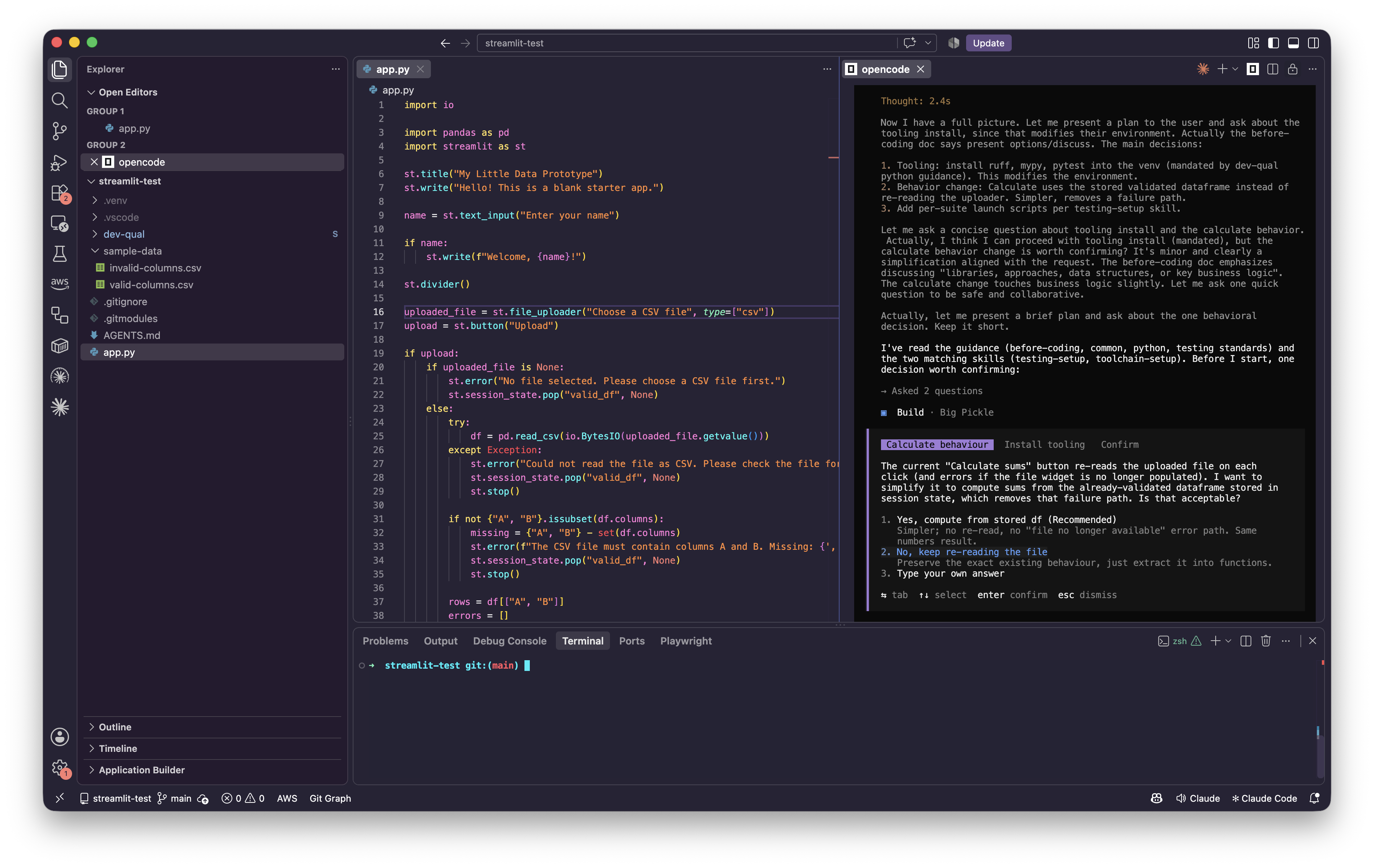
dev-qual, ask opencode to improve the code quality. Try a prompt like this:Using the code quality guidelines discoverable through
AGENTS.md, and any common standards for Python, update the code for this application. When done, give a summary of everything you changed. Please focus on: readability and simplicity of the code. Please break out functions as needed. Please ensure there are tests for as much of the code as possible.
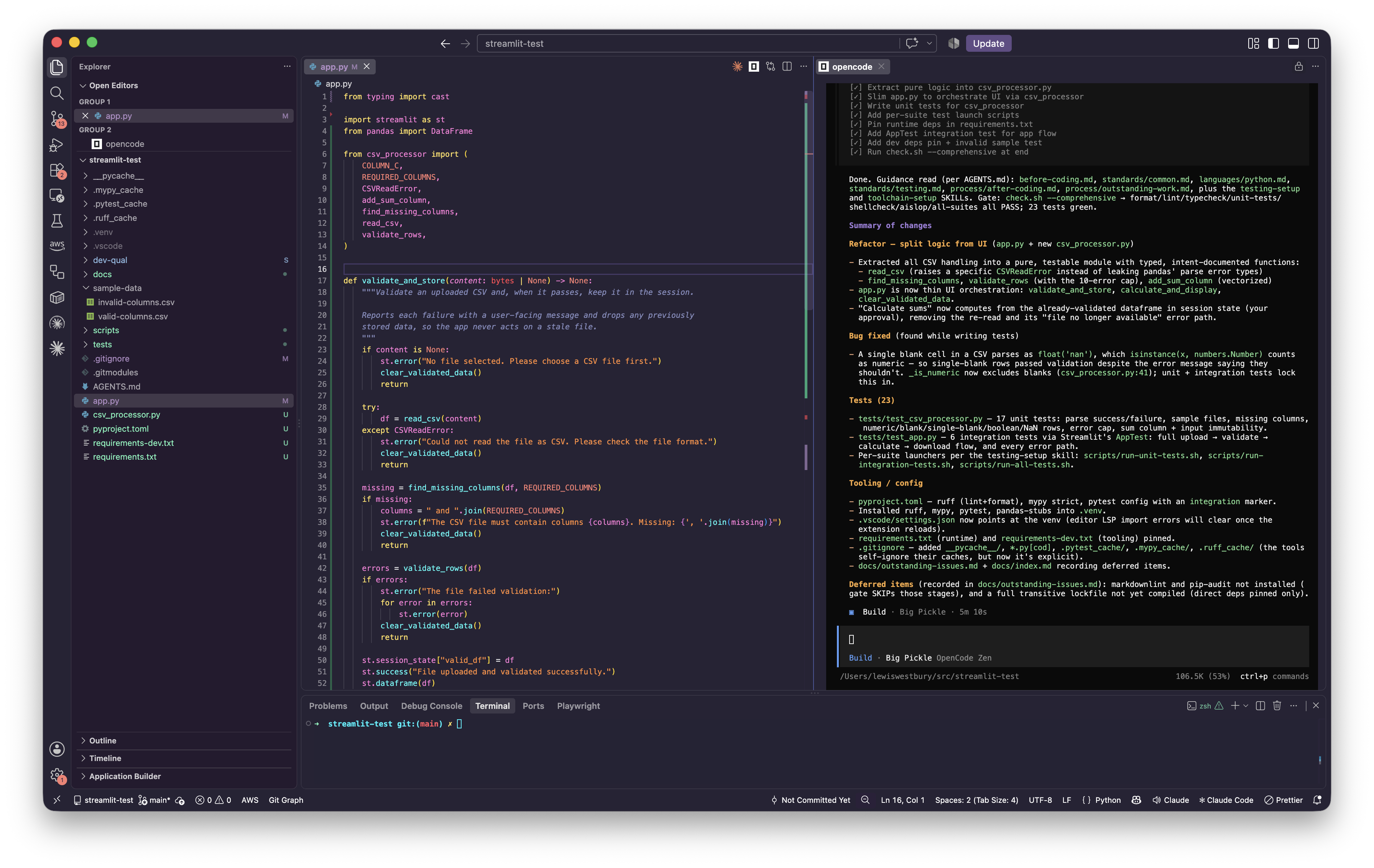
| Working on code quality… | Code quality changes complete |
|---|---|
 |
 |
Your agent will start by reading through what’s already there - guidelines, tools, and the code itself. It may ask to install some tools, and it will create new files including some shared functions, and some tests.
NB. For this first run, the agent asks to install a number of tools that will support code quality management (linting, and testing). It should then work through the code, break out what’s needed, and improve code quality.
Tools like ponytail and aislop will be invoked to constrain the code further, and the check.sh code script will be used to evaluate everything.
Once complete, you can run check.sh yourself to confirm that the code is compliant with your new standards:
dev-qual/scripts/check.sh
Detail...
check.sh — stacks: python (full mode)

-- format: ruff format --check .
76 files already formatted

-- lint: ruff check .
All checks passed!

-- typecheck: mypy .
Success: no issues found in 4 source files

-- unit-tests: pytest
================================================================================================== test session starts ===================================================================================================
platform darwin -- Python 3.14.6, pytest-9.1.1, pluggy-1.6.0
rootdir: /Users/lewiswestbury/src/streamlit-test
configfile: pyproject.toml
testpaths: tests
plugins: anyio-4.14.2
collected 23 items

tests/test_app.py ......                                                                                                                                                                                           [ 26%]
tests/test_csv_processor.py .................                                                                                                                                                                      [100%]

=================================================================================================== 23 passed in 1.53s ===================================================================================================

-- shellcheck: shellcheck ./scripts/run-all-tests.sh ./scripts/run-integration-tests.sh ./scripts/run-unit-tests.sh ./dev-qual/install.sh ./dev-qual/adapters/claude-code/install.sh ./dev-qual/adapters/opencode/install.sh ./dev-qual/scripts/check-prereqs.sh ./dev-qual/scripts/run-tests.sh ./dev-qual/scripts/setup-hooks.sh ./dev-qual/scripts/lint-docs.sh ./dev-qual/scripts/lib/common.sh ./dev-qual/scripts/check.sh ./dev-qual/scripts/check-install.sh ./dev-qual/skills/adr/scripts/adr-new.sh ./dev-qual/skills/testing-setup/scripts/run-suite-template.sh

-- markdownlint: markdownlint --config /Users/lewiswestbury/src/streamlit-test/dev-qual/scripts/../configs/markdownlint.json ./.pytest_cache/README.md ./docs/outstanding-issues.md ./docs/index.md ./AGENTS.md ./dev-qual/guidance/infra/aws-sam-cloudformation.md ./dev-qual/guidance/infra/gcp.md ./dev-qual/guidance/infra/terraform.md ./dev-qual/guidance/infra/verification.md ./dev-qual/guidance/infra/index.md ./dev-qual/guidance/infra/choosing-components.md ./dev-qual/guidance/infra/aws-cdk.md ./dev-qual/guidance/infra/azure.md ./dev-qual/guidance/ci/gitea.md ./dev-qual/guidance/ci/index.md ./dev-qual/guidance/ci/gitlab-ci.md ./dev-qual/guidance/ci/github-actions.md ./dev-qual/guidance/languages/markdown.md ./dev-qual/guidance/languages/python.md ./dev-qual/guidance/languages/csharp.md ./dev-qual/guidance/languages/node-scripting.md ./dev-qual/guidance/languages/index.md ./dev-qual/guidance/languages/cli-tools.md ./dev-qual/guidance/languages/typescript.md ./dev-qual/guidance/languages/shell.md ./dev-qual/guidance/index.md ./dev-qual/guidance/frameworks/express.md ./dev-qual/guidance/frameworks/aspnet-core.md ./dev-qual/guidance/frameworks/index.md ./dev-qual/guidance/frameworks/react.md ./dev-qual/guidance/frameworks/docker-compose.md ./dev-qual/guidance/frameworks/docker.md ./dev-qual/guidance/frameworks/nestjs.md ./dev-qual/guidance/process/fixing-issues.md ./dev-qual/guidance/process/outstanding-work.md ./dev-qual/guidance/process/model-allocation.md ./dev-qual/guidance/process/before-coding.md ./dev-qual/guidance/process/index.md ./dev-qual/guidance/process/testing-loop.md ./dev-qual/guidance/process/after-coding.md ./dev-qual/guidance/standards/principles.md ./dev-qual/guidance/standards/pitfalls.md ./dev-qual/guidance/standards/common.md ./dev-qual/guidance/standards/dependencies.md ./dev-qual/guidance/standards/testing.md ./dev-qual/guidance/standards/readability.md ./dev-qual/guidance/standards/index.md ./dev-qual/guidance/standards/databases.md ./dev-qual/guidance/standards/documentation.md ./dev-qual/agents-files/local/AGENTS.md ./dev-qual/agents-files/remote/AGENTS.md ./dev-qual/agents-files/remote/CLAUDE.md ./dev-qual/docs/outstanding-issues.md ./dev-qual/docs/index.md ./dev-qual/README.md ./dev-qual/all-requests.md ./dev-qual/prompts/002.1 - usage review improvements.md ./dev-qual/prompts/002.2 - usage improvement plan.md ./dev-qual/prompts/001.2 - quality and reliability enhancements plan.md ./dev-qual/prompts/001.1 - quality and reliability enhancements.md ./dev-qual/skills/adr/SKILL.md ./dev-qual/skills/deploy/SKILL.md ./dev-qual/skills/update-latest/SKILL.md ./dev-qual/skills/prereqs/SKILL.md ./dev-qual/skills/essential-behaviours/SKILL.md ./dev-qual/skills/project-setup/SKILL.md ./dev-qual/skills/docs-review/SKILL.md ./dev-qual/skills/toolchain-setup/SKILL.md ./dev-qual/skills/index.md ./dev-qual/skills/quality-review/SKILL.md ./dev-qual/skills/testing-setup/SKILL.md ./dev-qual/skills/deps-audit/SKILL.md ./dev-qual/skills/ci-setup/SKILL.md ./dev-qual/AGENTS.md

-- aislop: npx --yes aislop@latest scan
 aislop 0.14.0  ·  the quality gate for agentic coding

 Scan result  ·  streamlit-test  ·  python  ·  4 files

 Scope  4 file(s) after exclusions

 ✓ Clean run  ·  100 / 100  ·  Healthy  ·  no issues  ·  70ms

 ★ Found this useful? Star us at https://github.com/scanaislop/aislop
Final result:
== Results ==
PASS format
PASS lint
PASS typecheck
PASS unit-tests
PASS shellcheck
PASS markdownlint
PASS aislop
Great! Take a look around. You’ll find that your app.py is significantly simpler and, hopefully, easier to read.
You’ll also find supporting files with shared functions and tests (and those should be pretty easy to read, too). In my case:
csv_processor.pynow contains all the code that handles CSV files- the
tests/folder contains several test filestest_app.py- putsapp.pythrough its pacestest_csv_processor.py- similarly, testscsv_processor.py
There are also new scripts in a scripts/ folder, including:
scripts/run-all-tests.sh- runs all tests in the systemscripts/run-unit-tests.sh- runs all unit testsscripts/run-integration-tests.sh- runs all integration tests
We’ll talk more about different types of tests, and how you’d use them to exercise your application at different levels of detail in the next tutorial.
Summary
ℹ️ I let Big Pickle summarise this post. I tweaked it a little…
This post has been about producing code that’s reliable, readable, and easy to maintain — even when a coding assistant is doing the writing.
We covered the key guidelines for managing complexity:
- Break your code up into small functions that do one thing each, grouped sensibly across files and folders.
- Follow common conventions — document your project, use established patterns, lean on frameworks, and set quality constraints.
- Apply principles - DRY, KISS, YAGNI, and separation of concerns.
We also covered security essentials worth doing now: never store secrets in a public repository, and use strong passwords with 2FA.
Finally, we saw how to put this into practice automatically — encoding your standards in AGENTS.md and skills, or adopting a ready-made assembly like dev-qual (with aislop and ponytail included).
The bottom line: as your projects grow, no one can hold the whole thing in their head. Making your code easy to understand is the cheapest investment you can make — and it pays off every time you or your assistant change something.
Next, we’ll look at reliability and testing — how to give real assurances that your code does what you intended.
-
I’ve used slop in the title of this post - mainly to draw attention to it. It’s a common term, and reasonable for us to talk about it - but I’d still rather not turn it on someone as a criticism of their work. ↩︎
-
Use
CLAUDE.mdif you’re using Claude Code (instead of opencode). Anthropic are the notable holdout onAGENTS.md- everyone else has found a way to collaborate on this, as it’s a simple standard. ↩︎ -
If code quality was easy to measure, we could experiment with the effect of writing comments before writing code. ↩︎
-
KISS is also known as “Keep it simple, stupid!”, but I think that’s rude. ↩︎
-
The waterfall model of software development is an approach developed before modern techniques (such as agile or lean) were devised. It mandates a full specification of the project to be delivered first, which is then developed (in full), and tested (in full). The aim was to ensure quality through adherence to a specification. It falls down because this is a misunderstanding of quality. Requirements change constantly during software development, and specifications documents are unable to capture the nuance of real user needs. Without continuous customer and user involvement during software development, the finished product is rarely what the user expected, wanted, or needs. It offers no intervention points where effort can be redirected, or the outputs improved - which ultimately creates an unsatisfactory product (and potentially some expensive rewrites). ↩︎
-
The (amusing) description of ponytail does seem to put slightly too much focus on the physical appearance and gender of an experienced senior developer. I’ve taken that with a pinch of salt. The tool itself is good. ↩︎
-
Object Oriented Programming (OOP) is a programming approach built around objects. An object is a collection of functions and variables that can be thought of as a separate entity inside the program. These are often made from classes (which serve as templates), but each programming language has its own variants and approaches to this. Most programming languages support this to some degree, and many are built with this concept at their core. It’s a great way to manage resources, especially when building complex software. ↩︎
-
Git sub-modules exist in your repository as a directory, but they’re treated as their own repository, and all that’s tracked is the version they’re at. ↩︎ ↩︎